responsive website design | app Design | Prototyping | Wireframes
Adding extra security for skymiles members by creating a modern, efficient, omni-channel Multi-facotr authentication experience.
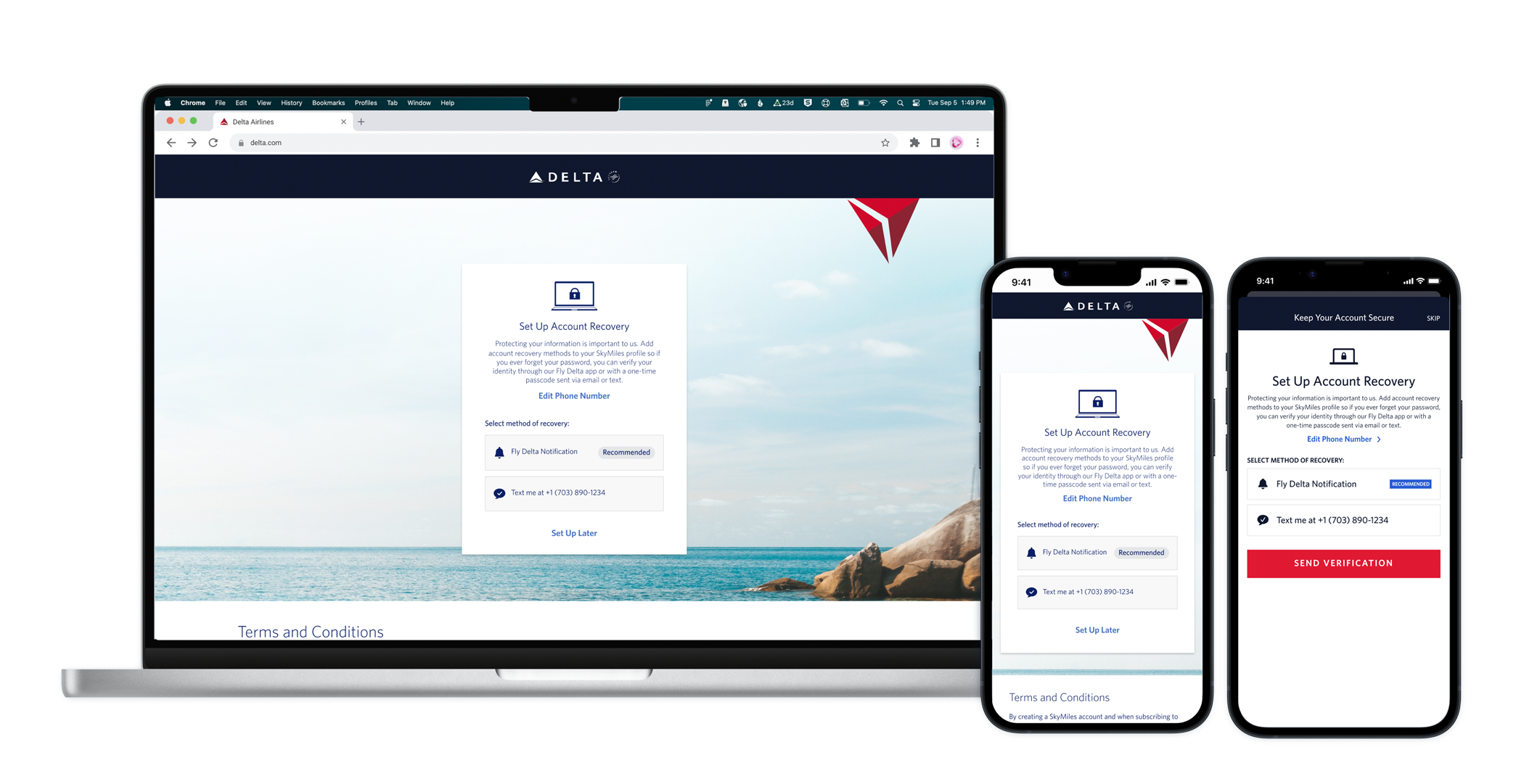
The Key asks
Overall:
Integrate the MFA process with an outside vendor (Ping)
Setting Up MFA:
Ensure a SkyMiles account has been created before allowing users to set up MFA methods
Setting up and verifying a users primary email address is required prior to setting up alternative methods
Creating a cross-channel experience:
Give users the ability to set up email, phone numbers and the Fly Delta App as verification methods
Add the ability to scan a QR code to set up Fly Delta as a verification method
Push users to use the Fly Delta App as a verification method to increase app downloads and adaption and give users the most secure way to verify ID
Utilize push notification and native iOS tools when applicable
Project Breakdown
Impacted Channels/Platforms:
Desktop & Mobile Responsive website
Fly Delta app
Impacted Flows / Areas of Focus:
SkyMile Enrollment
Setting Up MFA After
Logging into Delta.com / Fly Delta App
From marketing emails
After purchasing a flight
Account Recovery
SkyMile Profile
enrollment
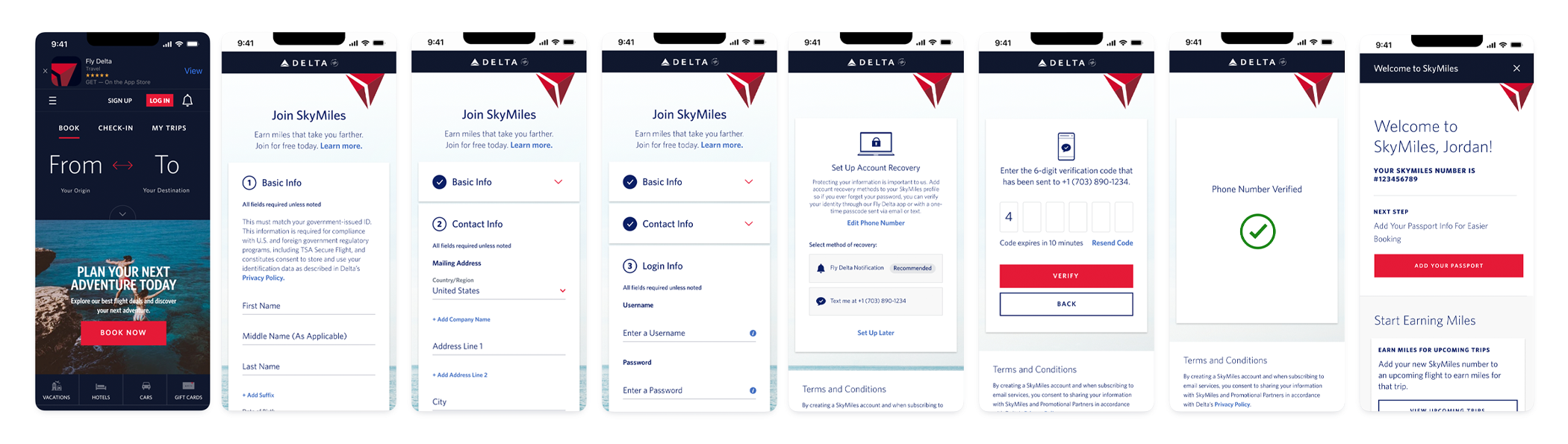
Process & Final Designs
Currently, Delta uses security questions and answers as their method of account recovery and security. To make the experience more secure, MFA is now replacing security questions and answers.
To ensure the transition is as seamless as possible, with the launching of MFA the enrollment form had to be updated to no longer give SQ&A as an option for users to utilize. Instead we were tasked with adding a way to start setting up MFA methods at the end of enrollment.
The key asks from the client were that the creation of the SkyMiles account had to occur first and that the process not get elongated a lot to avoid dropoff. The result was a 5-6 step process for enrolling in SkyMiles while also setting up 2 verification methods.
We first started the design process by creating mid to low fidelity wireframes to solidify the flow prior to going into design iterations. We then had 3 rounds of design reviews for both app and website designs.
The final designs include:
Removal SQ&A from the enrollment form
Automatically setup the users email address as a verification method
Giving users the option to set up a phone number of the Fly Delta app after submission of the enrollment form
Providing a QR code for desktop users to set up the Fly Delta app as a verification method
Allowing users to set up another method later, this is NOT a required enrollment step
Account Recovery
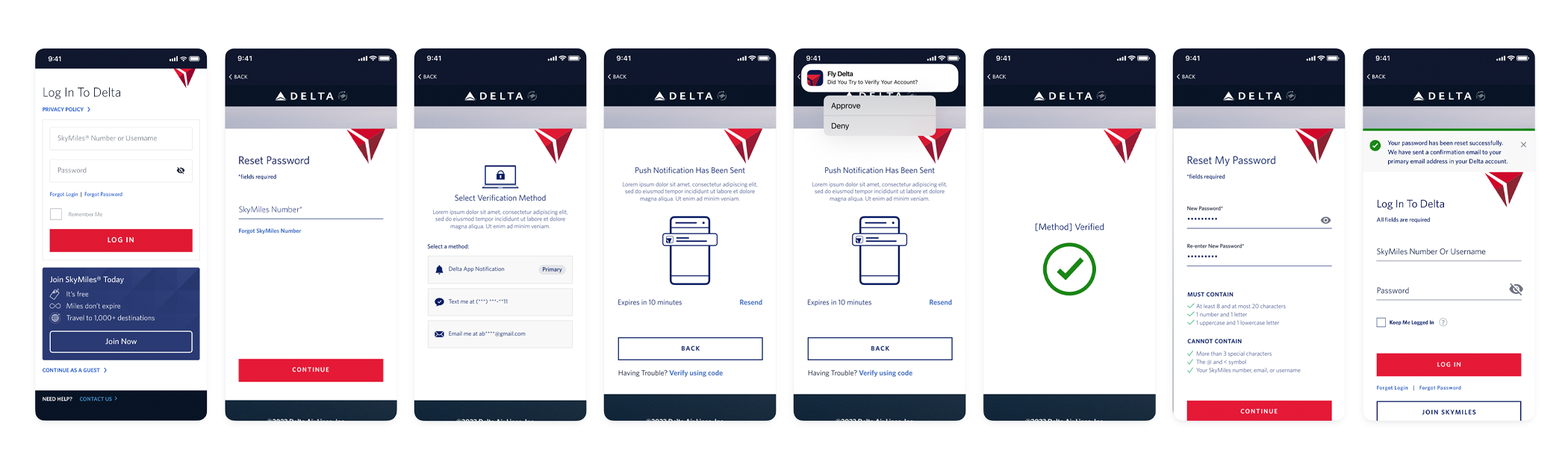
Process & Final Designs
Account recovery consists of setting up a new password if a user forgot their current one and also being sent their SkyMiles number/ username if they have forgotten their login.
Currently, in the account recovery flows, users have to answer the security questions & answers they set up during enrollment. While SQ&A are being rolled out, MFA is now being added as the way to verify identity prior to changing a password. For all new SkyMiles members and all existing member who go through the process of setting up MFA, this is the new flow they will encounter.
The key asks from the client were to make the experience as seamless as possible with few clicks. The result was a 2 click process for verifying identity.
We first started the design process by creating low fidelity box wireframes to solidify requirements and flows. We then had 2 rounds of design reviews. The account recovery process is the same for the app and website so different designs were not needed.
The final designs include:
Removed SQ&A from the account recovery process
Verifying ID prior to changing a password to remove the ability for any hackers/ bad actor to change a users password without their consent
Surface all methods that a user has set up (up to 5 methods)
Utilizes native push notifications
Provides a success animation for users to provide extra reassurance
Managing MFA within profile
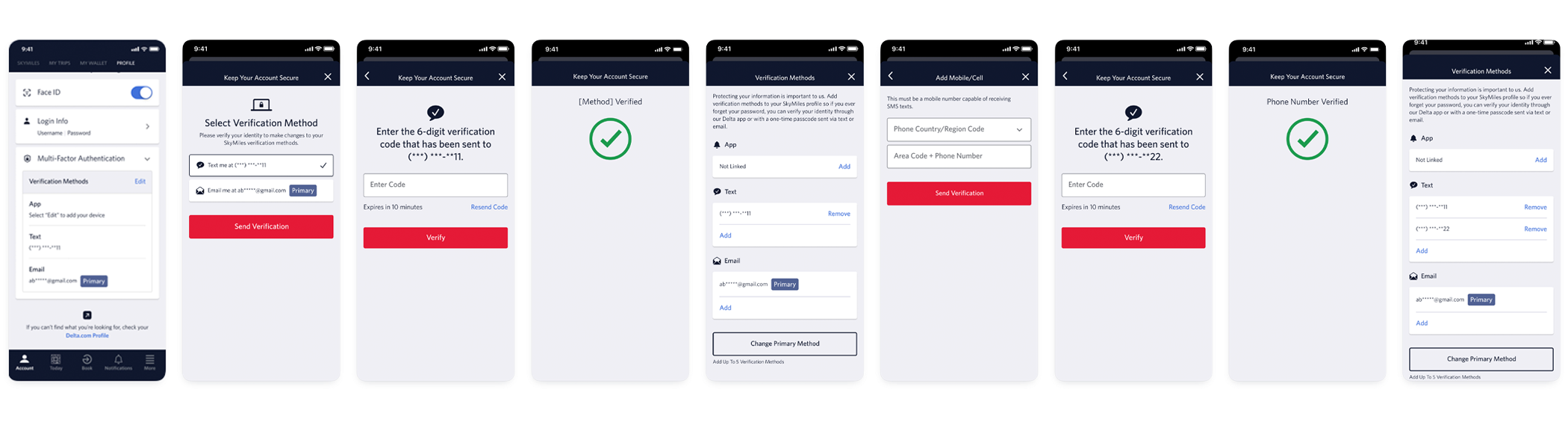
Process & Final Designs
We want to give existing SkyMiles users multiple opportunities to set up MFA and also need to provide a way for users to manage the methods they have set up. This led to a new section within a users SkyMiles profile.
In this new sections, users will be able to set up MFA for the first time, add additional verification methods, remove verification methods, and change with verification method is primary. In a future state of MFA, the primary method will be launched on default so a user will no longer need to select which method they want to use to verify their ID.
The key asks from the client were that a user only add or remove a method, no editing, that it is clear to users in the collapsed state what can be set up, and that only 5 methods can be set up in total.
We first started the design process by creating low fidelity box wireframes to solidify requirements and flows. We then had 2 rounds of design reviews designs for the app and website.
The final designs include:
Removed SQ&A from profile once email has been set up as a verification method
All methods are managed in one space
Verifying ID Prior to seeing all the methods that are set up to remove the ability for any hackers/ bad actor to change MFA methods without a users consent
The 3 categories of methods are shown in the collapsed state of profile and the primary method is clearly shown
Provided 3 separate add buttons for each category to allow for a seamless addition process and removed the need for a user to select which type of method they wish to add
Modals to ensure that a user has intended to remove a method (to cut down on accidental clicking)
Reflection
The biggest learning opportunity for this project was dealing with frequently changing requirements and technical limitations. The integration of the Ping system resulted in requirements taking longer to solidify than normal. This led us to changing out process slightly and honing in solely on flows at the beginning. This allowed us to present recommended flows to the client and for them to ensure this worked with the Ping integration and that there were no technical limitations. Solidifying those first allowed us to not rework designs multiple times.
Another key learning opportunity for me was being the main design lead on this project. The team consistent of a project manager, product manager, a client services member, myself (the UX lead) and then another designer. I was the only designer to remain on the project for the entire year. This led to me getting to know the project, clients and technical side of it very well and become an expert. This was a heavily technical project and a complex issue, but I was able to lead the team to a seamless end experience.
Overview
Time: 1 Year
Tools: Figma and After Effects
Skills: UX/UI, Wireframes, App Design, Web Design, Prototyping, Presentation